Xiaomi laptops have grown in popularity for their sleek designs, strong performance, and competitive pricing. Yet, like all devices, their batteries gradually lose efficiency over time. A worn-out battery can affect your laptop's runtime, slow performance, and even cause unexpected shutdowns.
Replacing your Xiaomi laptop battery is often a straightforward process. However, it requires careful attention to detail to avoid damage to your laptop or the new battery. This article guides you through everything you need to know, from identifying battery problems to safely installing a replacement.
By the end, you’ll gain the knowledge to handle battery replacement confidently, prolong your laptop’s lifespan, and ensure optimal performance. Whether you’re tech-savvy or a beginner, these steps are practical and easy to follow.
Understanding Your Xiaomi Laptop Battery
Xiaomi laptops primarily use lithium-ion (Li-ion) batteries, which are known for high energy density, low self-discharge, and a long lifespan when properly maintained. Some newer models may use lithium-polymer (Li-Po) batteries, which offer more flexible shapes and slightly better safety under physical stress. Understanding the type of battery your laptop uses is crucial before attempting a replacement.
Most Xiaomi laptops feature built-in, non-removable batteries. This means you must open the device carefully to access the battery, rather than simply sliding it out. Attempting removal without proper tools or knowledge can damage internal components like the motherboard or connectors.
Battery specifications vary depending on the model. For example, the Xiaomi Book Pro 15 has a 56Wh battery, while the Xiaomi Book Air uses a smaller 50Wh battery. Checking your exact model ensures you purchase a compatible replacement. Using the wrong battery can lead to poor performance, charging issues, or even safety hazards.
Safety precautions are essential. Always power off your laptop, disconnect all cables, and work on a static-free surface. Avoid using metal tools that can short-circuit the battery. Handling Li-ion or Li-Po batteries improperly can result in overheating, swelling, or even fire.
Understanding your battery’s specifications and risks is the first step to a successful replacement. In the next chapter, we will discuss how to recognize when a Xiaomi laptop battery needs replacement, so you can act before performance declines significantly.
Signs Your Xiaomi Laptop Battery Needs Replacement
A failing battery rarely goes unnoticed. Recognizing early warning signs can save you from unexpected shutdowns and data loss. Here are the most common indicators that your Xiaomi laptop battery may need replacement:
1. Rapid Battery Drain
If your fully charged laptop loses power within an hour or two, it indicates reduced capacity. Over time, lithium-ion batteries naturally degrade, losing the ability to hold a full charge. For instance, a new Xiaomi Book Pro 15 battery lasts around 10–12 hours, but an old battery may drop to just 3–4 hours.
2. Unexpected Shutdowns
Even with a reasonable charge level, a laptop may suddenly turn off. This often occurs because the battery cannot deliver stable voltage under load. Frequent shutdowns can harm both your operating system and hardware.
3. Swelling or Physical Deformation
A swollen battery is a serious safety concern. You may notice a lifted keyboard, bulging case, or irregular seams. Swelling is caused by internal chemical reactions and must be addressed immediately. Continuing to use a swollen battery risks fire or permanent device damage.
4. Slow Charging or Failure to Charge
If your Xiaomi laptop takes much longer than usual to charge or does not charge at all, it could be due to a degraded battery. Check your charger and ports first, but persistent issues usually point to battery health decline.
5. Battery Health Reports
Most Xiaomi laptops allow users to check battery health through software. On Windows, you can run powercfg /batteryreport in Command Prompt to generate a detailed report. A significant drop in design capacity versus current full charge indicates replacement is needed.
Recognizing these signs early ensures you replace the battery before it disrupts productivity or risks safety. In the next chapter, we will provide a step-by-step guide to safely replacing your Xiaomi laptop battery, including tools, techniques, and safety tips.
Step-by-Step Guide to Replacing Your Xiaomi Laptop Battery
Replacing a Xiaomi laptop battery requires precision and care. Follow these steps carefully to avoid damaging your laptop or the new battery.
Step 1: Prepare Your Workspace
Choose a clean, flat surface with good lighting.
Use an anti-static mat or wrist strap to prevent static discharge.
Gather all necessary tools: small Phillips screwdriver, plastic spudger, and a replacement battery compatible with your Xiaomi model.
Step 2: Power Down and Disconnect
Shut down your laptop completely.
Unplug the charger and any connected peripherals.
Wait a few minutes to allow internal components to cool.
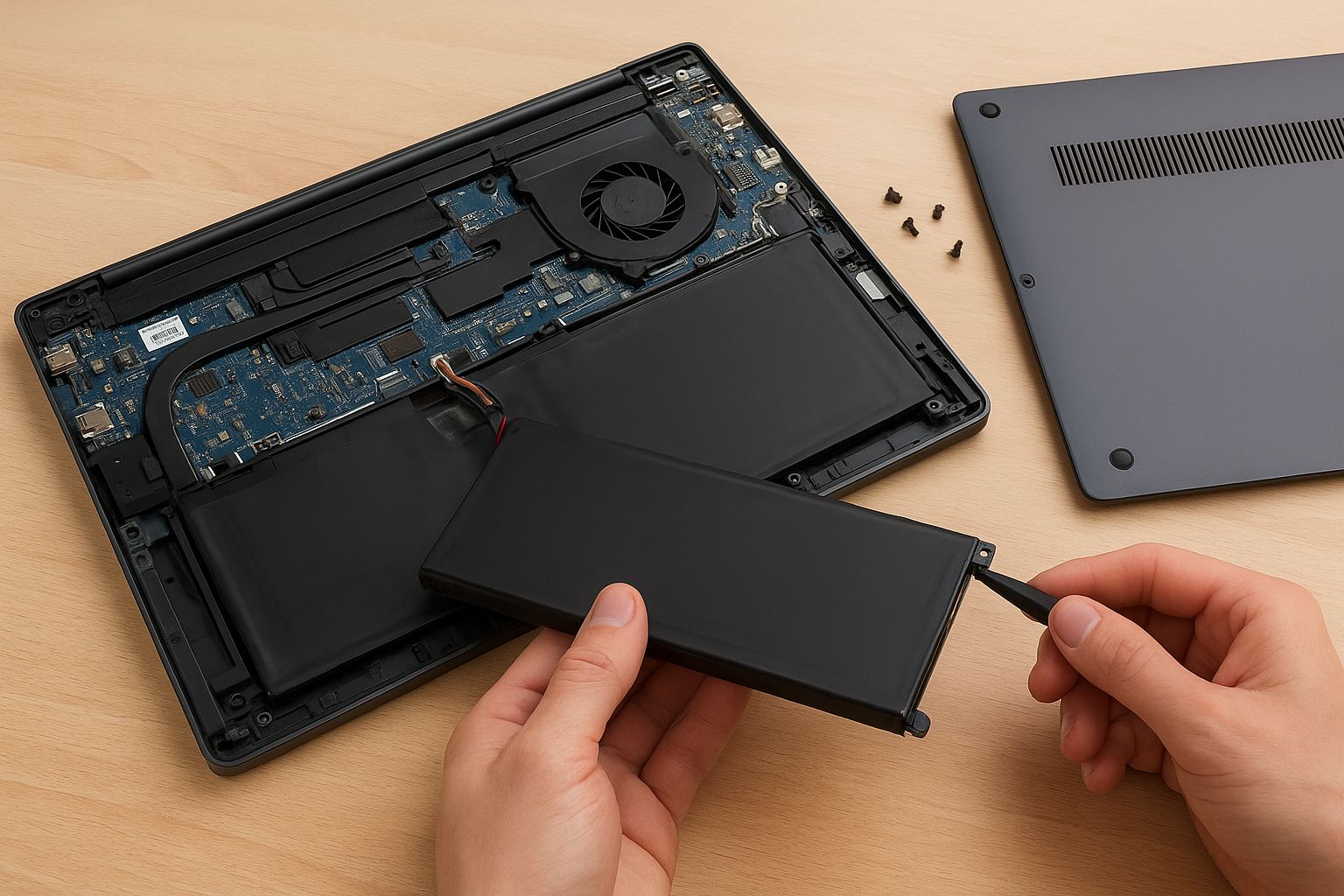
Step 3: Remove the Back Cover
Locate and remove all screws securing the back panel. Keep them organized.
Use a plastic spudger to gently pry open the back cover. Avoid metal tools to prevent scratching or shorting internal components.
Step 4: Disconnect the Battery
Identify the battery connector on the motherboard.
Carefully unplug the battery cable without forcing it. Damaging the connector can make the laptop unusable.
Remove any screws or adhesive securing the battery in place.
Step 5: Remove the Old Battery
Step 6: Install the New Battery
Align the new battery with the compartment.
Secure it with screws or adhesive as required.
Reconnect the battery cable firmly but gently to the motherboard.
Step 7: Reassemble the Laptop
Reattach the back cover and tighten all screws.
Plug in the charger and power on your laptop.
Check that the system recognizes the new battery and that it begins charging normally.
Step 8: Calibrate the Battery
Fully charge the battery to 100%, then use the laptop until it shuts down due to low power.
Recharge it to 100% again without interruption. This helps the laptop accurately measure battery capacity.
By following these steps, you can replace your Xiaomi laptop battery safely and efficiently.
Tips for Maintaining Your New Xiaomi Laptop Battery
Proper maintenance can significantly extend the life of your Xiaomi laptop battery. Small adjustments in usage habits make a big difference.
1. Avoid Full Discharges
Lithium-ion batteries perform best when kept between 20% and 80% charge. Regularly letting your battery drop to 0% can reduce its lifespan.
2. Use the Original Charger
Always use the charger provided by Xiaomi or a certified replacement. Third-party chargers may deliver inconsistent voltage, risking battery damage.
3. Keep Your Laptop Cool
High temperatures accelerate battery degradation. Avoid using your laptop on soft surfaces like beds or couches that block ventilation. Consider a cooling pad for prolonged use.
4. Monitor Battery Health
Check battery status regularly through Windows Battery Report or Xiaomi’s system diagnostics. Early detection of anomalies helps prevent sudden failures.
5. Update Firmware and Drivers
Xiaomi occasionally releases updates that optimize power management. Keeping your system updated ensures efficient charging and discharge cycles.
6. Store Properly if Not in Use
If you won’t use your laptop for an extended period, charge it to around 50% and store it in a cool, dry place. This prevents deep discharge or swelling.
By adopting these practices, you can maximize your new battery’s lifespan and maintain reliable laptop performance for years.
Conclusion
Replacing your Xiaomi laptop battery is a manageable task when approached with care, the right tools, and proper knowledge. By understanding your battery, recognizing warning signs, following a step-by-step replacement guide, and maintaining the new battery, you ensure long-term performance and safety.
A well-maintained battery not only improves runtime but also protects your investment in your Xiaomi laptop. With attention to detail and consistent care, your laptop can deliver optimal performance for years to come.